Night Hack × HeyPCB.
Ask your coding agent for a circuit board, and HeyPCB designs it as a real KiCad project. Attendees get a month of Starter free. The 3 winners get their boards made.
Redeem your code.
- 01
Sign in.
Use the account you will build with. A new email makes a new account.
- 02
Redeem your code.
It came by email. Checkout shows $0.00 due today and asks for no card.
- 03
Start building.
Starter is on your account. Your boards are in your dashboard.
Start in one paste.
Pick your agent, copy its line and paste it. Your agent can then design boards with HeyPCB.
claude mcp add --transport http --scope user heypcb https://api.heypcb.ai/mcpcodex mcp add heypcb -- npx -y @heypcb/mcp && npx -y @heypcb/mcp login{
"mcpServers": {
"heypcb": {
"url": "https://api.heypcb.ai/mcp"
}
}
}https://api.heypcb.ai/mcphttps://api.heypcb.ai/mcpPaste it.
Run it in your terminal, then open Claude Code.
Sign in and approve.
Type
/mcp, pick heypcb, choose Authenticate, and press Approve on the page that opens.Ask.
Paste the first prompt below, or ask for any board you want.
Paste it.
Run it in your terminal. It needs Node.js 18 or newer.
Sign in and approve.
Your browser opens heypcb.ai with a code. Check it matches your terminal, then press Approve.
Ask.
Paste the first prompt below, or ask for any board you want.
Paste it.
Put it in
~/.cursor/mcp.json, or add it in one click.Sign in and approve.
Cursor opens heypcb.ai in your browser. Sign in if it asks, then press Approve.
Ask.
Paste the first prompt below, or ask for any board you want.
Paste it.
In Claude, open Settings → Connectors, choose Add custom connector and paste it.
Sign in and approve.
Choose Connect on the connector, and press Approve on the page that opens.
Ask.
Paste the first prompt below, or ask for any board you want.
Paste it.
Add it to your client as a remote MCP server.
Sign in and approve.
Your client opens heypcb.ai in your browser. Sign in if it asks, then press Approve.
Ask.
Paste the first prompt below, or ask for any board you want.
New to HeyPCB? Signing in on the approve page makes your account. Redeem your code on that same account.
Your first prompt
Then paste this into your agent.
Your agent sends the brief to HeyPCB, which picks real parts, places and routes the board, and checks it. You get a link to the files a board house needs.
Use HeyPCB to design a small ESP32-S3 sensor board: USB-C for power and programming, a BME280 temperature, humidity and pressure sensor, a status LED, and BOOT and RESET buttons. When it is built, check it until it is ready to order, then export the files for JLCPCB and give me the download link.
On October 27, Claude Code had this board ready to order in 25 minutes. Your agent may go quiet while it works.
Every client HeyPCB works with is on the MCP server page.
What you can build tonight.
Open boards made with HeyPCB. Each repo has the KiCad 10 project.
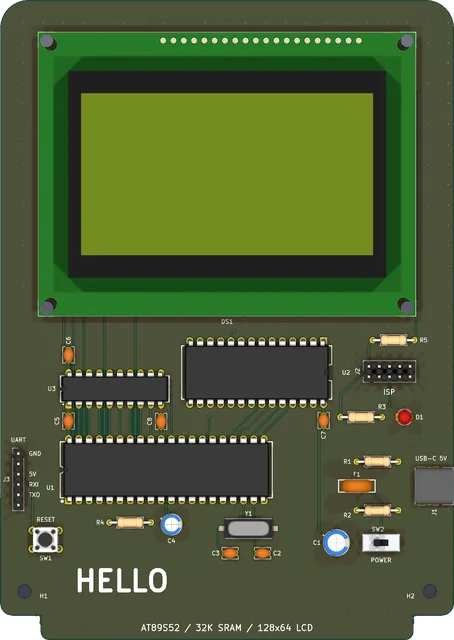
Fig. 02 · 2 layers · 112 × 158 mm · MIT
HELLO, an 8051 computer
AT89S52, 32 KB of SRAM, a 128×64 LCD and USB-C power, with firmware that writes hello.
An agent built it through HeyPCB's MCP server.
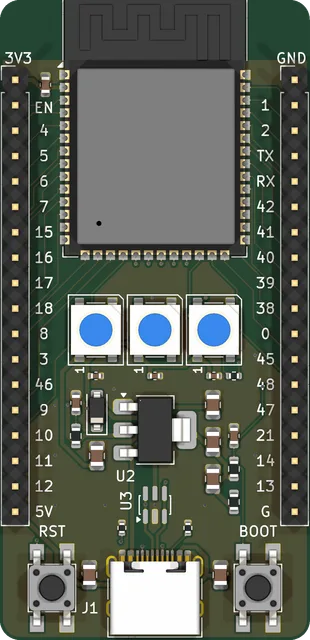
Fig. 03 · 4 layers · 31 × 64 mm · MIT
ESP32-S3 dev board
ESP32-S3-WROOM-1, native USB-C, three WS2812B LEDs and two 18-pin headers.
An agent built it through HeyPCB's MCP server.
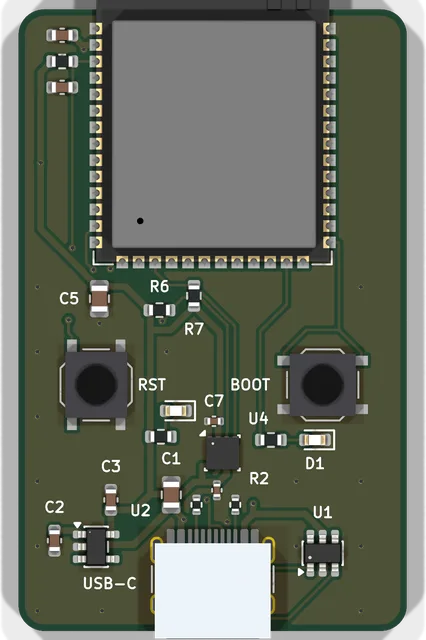
Fig. 04 · 4 layers · 30 × 48 mm · CERN-OHL-S-2.0
ESP32-S3 weather sensor
ESP32-S3-WROOM-1, a Bosch BME280 on I²C, USB-C, BOOT and RESET.
Made with HeyPCB's own method on KiCad 10.
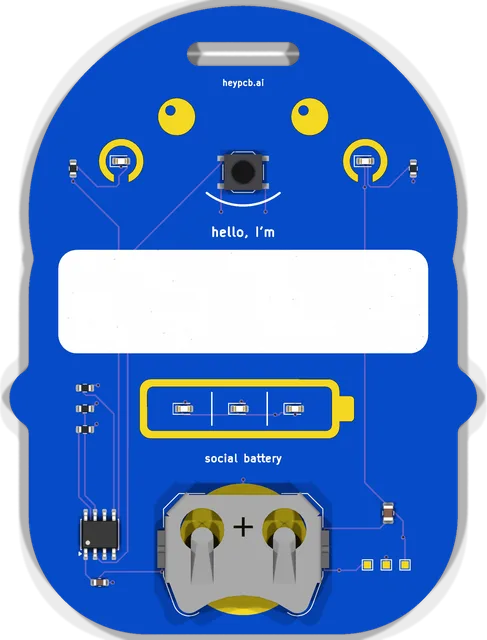
Fig. 05 · 2 layers · 63 × 85 mm · CERN-OHL-S-2.0
Blob, a name badge
ATtiny412, a social battery of three LEDs, a button and a CR2032.
Made with HeyPCB's own method on KiCad 10.
Prizes and help.
$500
Per winner, for 3 winners
Your board, made.
Fabrication up to $500 for each winner, shipping included. A run usually costs under $100. HeyPCB sorts out each order with the winner and ships it.
1 month
Starter, for 100 attendees
HeyPCB, free.
Starter free for a month, for 100 attendees, with codes sent by email. More codes if more people come.
October 30
At Founders Inc
Help on site.
Inky from the HeyPCB team will be there in person with a few interns, to help you build and to judge.
Before you ask.
- What does the free plan include?
HeyPCB Starter, which is $20 a month:
- AI work included each month
- Up to 10 projects
- Design-file downloads for 10 boards
- Multiplayer: invite up to 5 people to each board
- Low and High effort
- Enclosures and 3D product design
- Firmware and scripts in the Code tab
- What happens when it ends?
- The plan ends by itself and nothing is charged. To keep Starter, choose it again in Settings.
- Do I need a card?
- No. Checkout shows $0.00 due today and asks for no card.
- My account already has a plan.
- A code works only on an account with no plan, including a free one from an earlier code. Redeem it on another account, or find the HeyPCB team at the event.
- Where do I get help?
- At the event, find Inky and the interns from the HeyPCB team. Any time, ask in HeyPCB’s Discord or write to support@heypcb.ai.